
Category Page Overview
The Category Page displays different genres or video categories available on the platform. It helps users quickly navigate to a specific type of content (like Action, Romance, Horror, etc.) by visually showcasing each category as a card with an image and label. Clicking on a category redirects users to a list of videos under that genre.
User Interface Breakdown
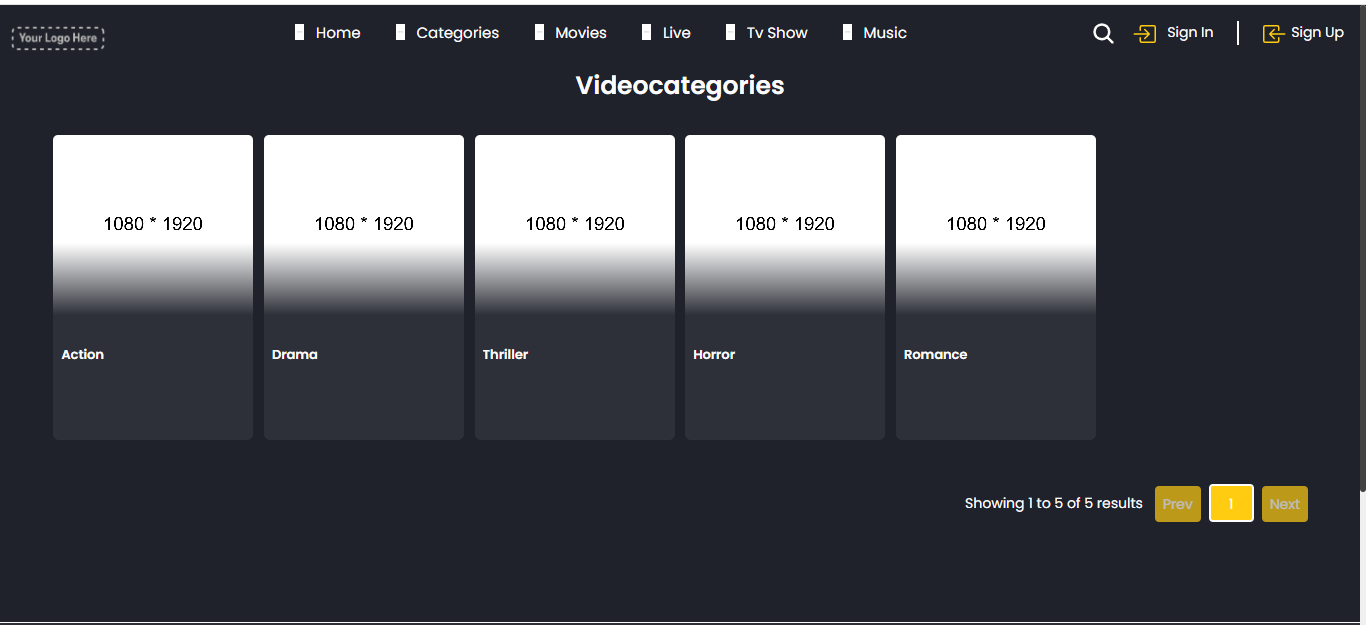
- Header Section
- Logo (Top Left): Serves as the brand identity; clicking it usually redirects to the homepage.
- Navigation Menu (Home, Movies, TV Shows, Live, Audio): Allows quick access to core content areas. Each icon with a label helps users identify sections easily.
- Search Icon: Clicking this allows users to search for videos, genres, or keywords.
- User Options (Sign In / Sign Up):
- Sign In for existing users to log in.
- Sign Up for new users to register and access premium features.
- Sign In for existing users to log in.
- Main Category Section
- Page Title – “Video Categories”: Clearly indicates the current section the user is viewing.
- Category Cards (e.g., Thriller, Fantasy, Romance, Horror, Action): Each category is displayed as a clickable card with a visual background. Hovering over the card reveals interaction (like click effects). Helps users quickly jump to videos filtered under each genre.
- Responsive Layout: Grid-like layout adapts to screen size for smooth navigation across devices.
- Pagination Section
- Showing Results Text (e.g., “showing 1 to 0 of 0 results”): Displays the number of categories currently visible and total available.
- Prev / Next Buttons: Allows users to move between multiple pages of categories if available. Yellow highlighting makes the active page (e.g., Page 1) clear and distinguishable.
- Footer Section
- Brand Logo (Bottom Left): Reiterates branding and builds familiarity.
- Services: Audio / Live – Quick access links to specific media formats.
- About Section: Links to pages like Latest Videos and TV Shows for extended browsing.
- Policies & Info (Right Column): Terms and Conditions, Privacy Policy, About Us, and other static pages relevant for legal or informational use.
- Social Media Icons: Connects users to social platforms like Instagram, Facebook, TikTok, YouTube, and more for community and updates.
- Copyright Notice: States ownership and protection of the platform’s content and design.
- Example: “© Copyright 2025. All Rights Reserved.”
- Example: “© Copyright 2025. All Rights Reserved.”