
The Comment Section feature is used to manage the availability of comments across different content types on the OTT platform. It allows enabling or disabling comments for videos, live streams, episodes, and audio content.
This feature ensures:
- Complete control over where and when comments are permitted, ensuring a safe and well-managed interaction environment.
- Tailored engagement by turning comments on or off for specific content types such as videos, live streams, episodes, and audios.
- Quality conversations by filtering and moderating comments through an approval process to prevent spam or inappropriate content.
- Building a community and adding value to content by encouraging interaction between creators and audiences.
All these measures work to strengthen audience connection and enrich the overall viewing experience.
Comment Options
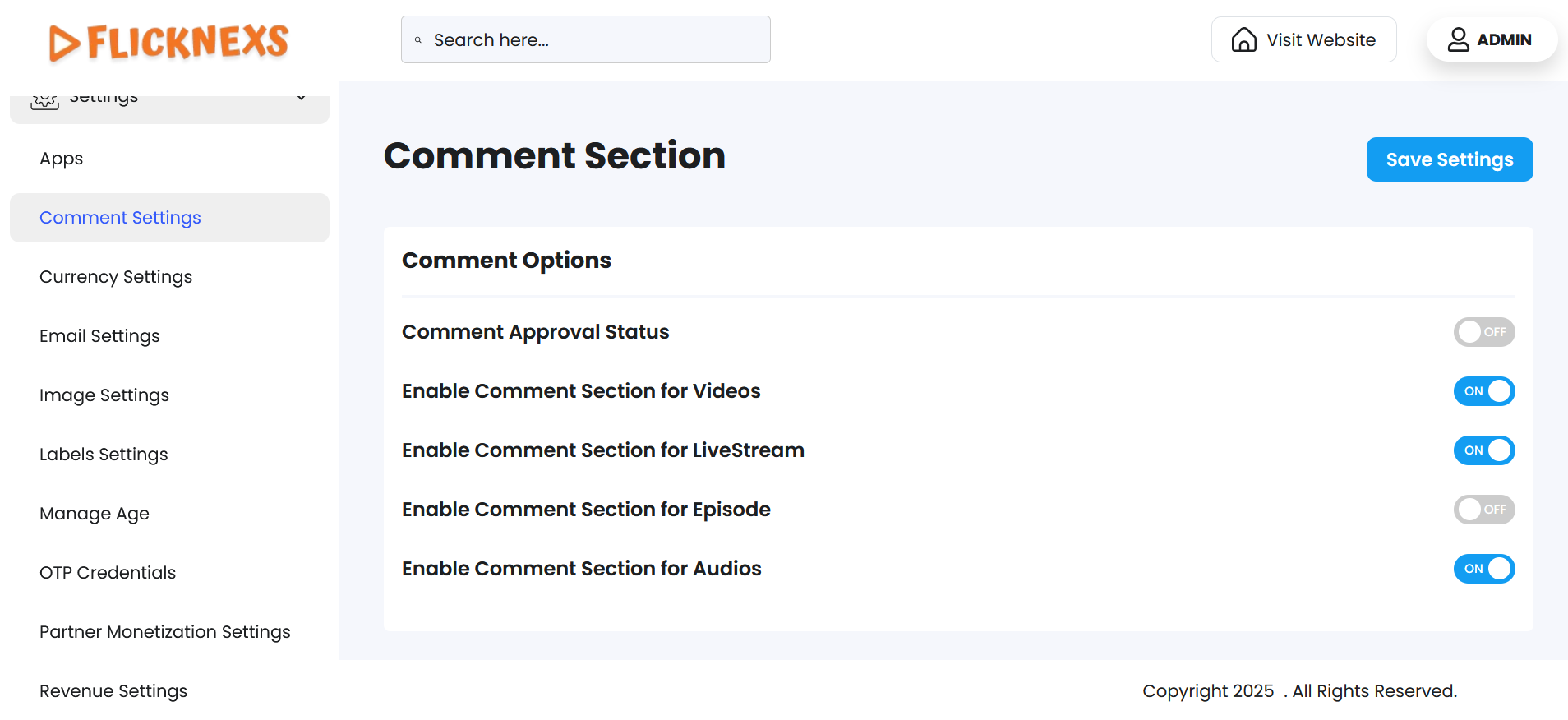
It is used to configure the availability of comments across various content types on the platform. Each setting can be adjusted by toggling to control the functionality as required.
- Comment Approval Status: Defines whether comments require administrative approval before being displayed publicly. The available options are as follows:
- ON: Comments require admin approval before being published.
- OFF: Comments are posted immediately without approval.
- Enable Comment Section for Videos: Controls the comment section for all uploaded videos. The available options are as follows:
- ON: Comments are enabled for videos.
- OFF: Comments are disabled for videos.
- Enable Comment Section for Live Stream: Determines whether comments are allowed during live streaming sessions.The available options are as follows:
- ON: Viewers can post comments during live streams.
- OFF: Comments are disabled during live streams.
- Enable Comment Section for Episodes: Manages the comment section for episodes within a series. The available options are as follows:
- ON: Comments are enabled for episodes.
- OFF: Comments are disabled for episodes.
- Enable Comment Section for Audios: Controls commenting for audio content such as podcasts or music.The available options are as follows:
- ON: Comments are enabled for audio content.
- OFF: Comments are disabled for audio content.
Comments serve as a bridging tool, and analyzing them can reveal audience behavior patterns specific to the platform, which can be utilized to shape the content strategy.
They must be considered a critical factor in content planning and analysis, as platforms that effectively address audience expectations and preferences are better positioned to sustain growth and remain competitive in the market.