
Home Page – Guide
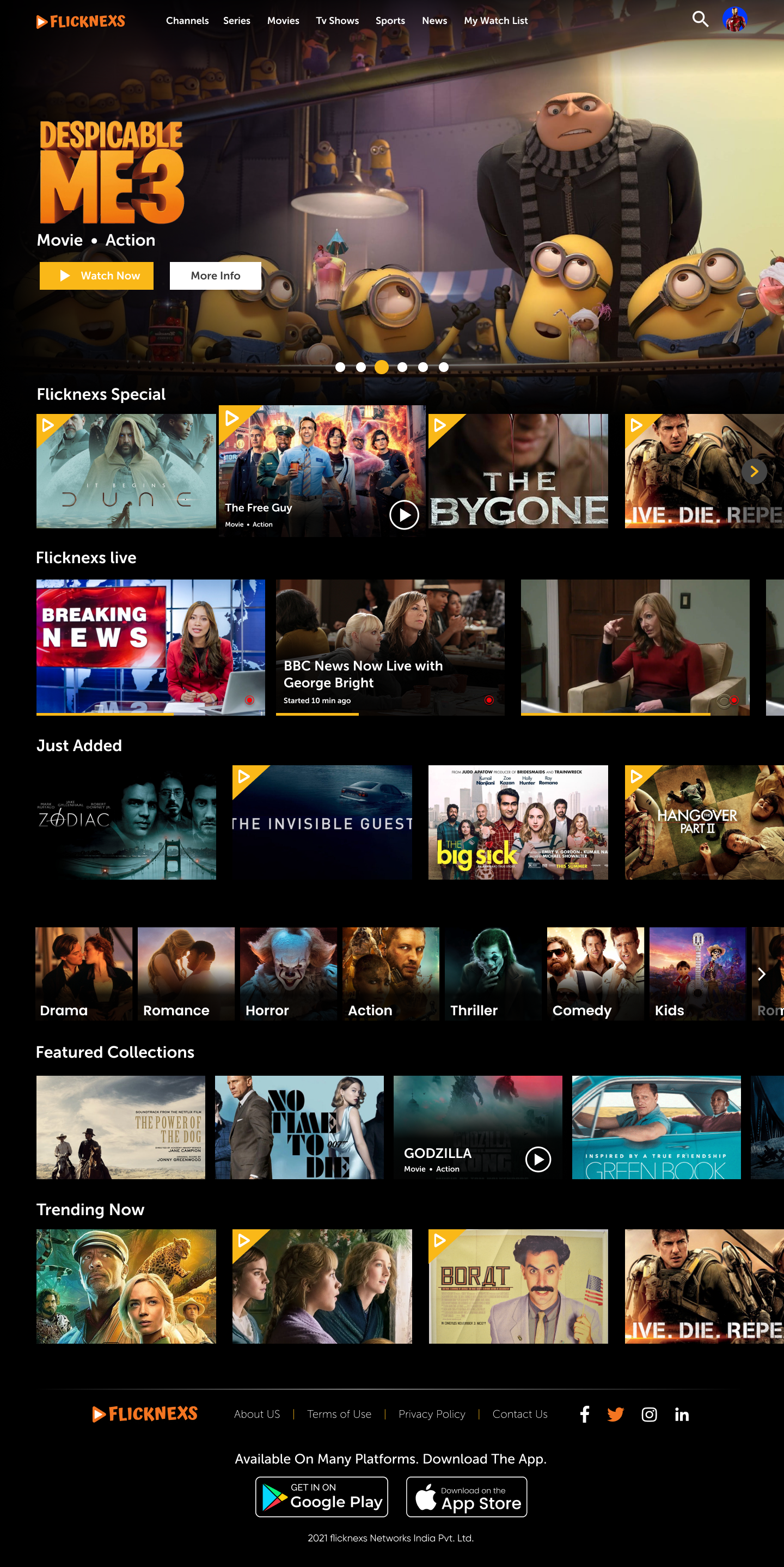
This guide outlines the layout, features, and user interaction elements on the Home Page of the website.
1. Header Section
The sticky top bar that remains visible as the user scrolls.
- Platform Logo (Top Left):
- Clickable logo that redirects to the home page.
- Clickable logo that redirects to the home page.
- Navigation Links:
- Home – Redirects here.
- Movies – Takes users to the latest Video’s page.
- TV Shows – Opens the series section.
- Live – Navigates for live streaming content or events.
- Audio – For music, podcasts, or audio stories.
- Home – Redirects here.
- User Access Options (Top Right):
- Search icon – Opens search bar or modal for content lookup.
- Sign In – Existing users can log in.
- Sign Up – For new users to create an account.
- Search icon – Opens search bar or modal for content lookup.
2. Slider Section (Featured Content Carousel)
This section is a dynamic, horizontal slider showcasing featured and promotional content.
- Slides auto-rotate or can be manually navigated via arrows.
- Each slide contains:
- Large thumbnail/banner of a featured movie/show.
- Title, Year, Runtime, Language
- Brief description of the content.
- Play button icon to start watching directly.
- Clean and bold visual presentation for maximum user attention.
- Large thumbnail/banner of a featured movie/show.
- Ideal for:
- Promoting latest releases, most viewed, or editor picks.
- Promoting latest releases, most viewed, or editor picks.
3. Content Carousels & Sections
Below the slider, multiple content sections are arranged in horizontal scrolling format.
Each section includes:
a. Section Title & Action
- Title indicating content type (e.g., “Continue Watching”, “Trending Now”).
- “View All” link on the right lets users browse full lists.
b. Content Cards/Thumbnails
Each card contains:
- Poster or thumbnail image
- Title
- Year and duration
- Short label or description
- Access label (Free, Registered, Premium)
- Content includes a hover effect for quick previews or actions (e.g., play, info).
4. Content Categories (Examples)
- Continue Watching – Shows in-progress videos.
- Trending Now – Popular across the platform.
- Popular Categories – Based on genre or user activity.
- Featured Collections – Curated mixes (e.g., “Top Picks”, “Award Winners”).
- Genre-Based Carousels – E.g., Action, Romance, Drama, Horror, Fantasy.
- Recommended for You – Based on viewing history.
- Recently Added – Latest content uploads.
- Partner – May show promoted or sponsored content.
5. Footer Section
Located at the bottom of the page.
a. Brand & Navigation
- Repetition of the logo for brand reinforcement.
b. Navigation Columns
- Services: Audio, Live
- About: Latest Videos, TV Shows
- Support: Terms and Conditions, About Us, Pages, Privacy Policy
c. Social Media Links
- Icons linking to platforms like:
- Facebook, Instagram, YouTube, Twitter (X), LinkedIn, TikTok
d. Copyright
- Copyright is a legal right that grants the creator of original content exclusive ownership and control over the use, distribution, and reproduction of that content.