
TV Activation Code
1. What is the TV Activation Code and How Is It Used?
The TV Activation Code is a unique code displayed on your TV screen when you try to log in to the app on supported devices such as:
- Android TV
- Amazon Fire TV
- Samsung Smart TV
- LG Smart TV
- ROKU
This code is required to link your account to the TV app. Instead of entering your email and password directly on the TV, you simply enter this code from a browser or mobile device logged into your account.
2. How to Find the Activation Code on Your TV
When you open the app on any of the supported TV platforms and choose to log in, a TV activation code (e.g., HA2G, QRT5) will be displayed on the screen. This code is unique and time-sensitive.
3. Where to Enter the TV Activation Code
Step-by-Step Instructions:
- Login to your account from a browser (mobile or desktop).
- Click your profile icon at the top right.
- From the dropdown, select “My Profile” to go to the profile settings page.
- On the left side menu, click “Device Management”.
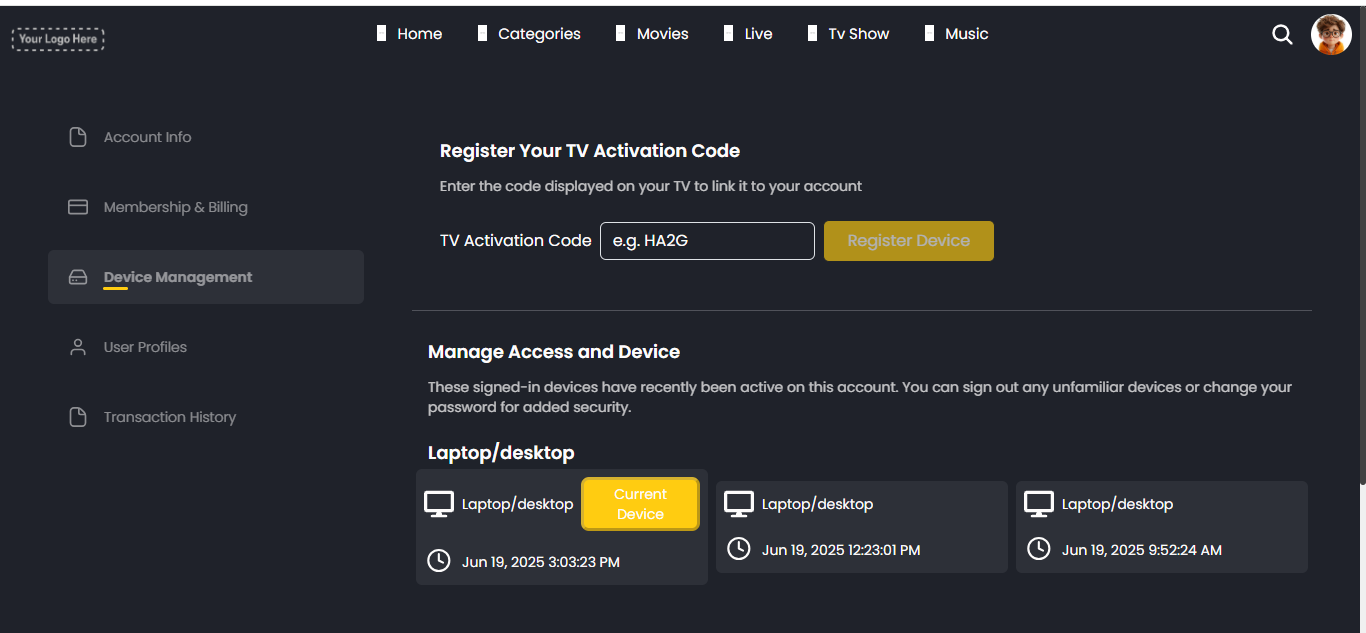
- In the Device Management page, you’ll see a section titled “Register Your TV Activation Code.”
- Enter the activation code you saw on your TV screen into the “TV Activation Code” input field.
- Click “Register Device” to link your TV to your account.
Once done, your TV app will automatically refresh and log you in.
4. Device Management Page
This page helps you manage all devices currently or recently connected to your account:
- TV Activation Code Input Field: This is where you enter the code shown on your TV.
- Register Device Button: Confirms the code and links the TV to your account.
- Manage Access and Device section:
- Lists all connected devices (Mobile, Laptop/Desktop, and TV).
- Shows login type and last activity timestamp.
- Helps identify unfamiliar logins for security.
- You can sign out devices or monitor suspicious activity here.
- Lists all connected devices (Mobile, Laptop/Desktop, and TV).